
Nintex Community Menu Bar
Answer

How to control the visibility over the input forms depending on what I selected from the options

  • May 21, 2020
  • 3 replies
  • 99 views

Hi there:)

I'm currently working in a new team and my knowledge is really poor please help me..

I just wondering is there any way to make the input forms visible or invisible depending on my choice that I selected from the options?

As these are with default setting, I can see the options and all of input forms that I have set over NintexForms but at this time, I want to control the visibility over the input forms and it should be connected with a choice from the options. I think I need to write some codes for this but it's too difficult for me...any idea?


Thank you
Best answer by SimonMuntz

Hi,

In classic forms you apply a rule to the control you want to hide.

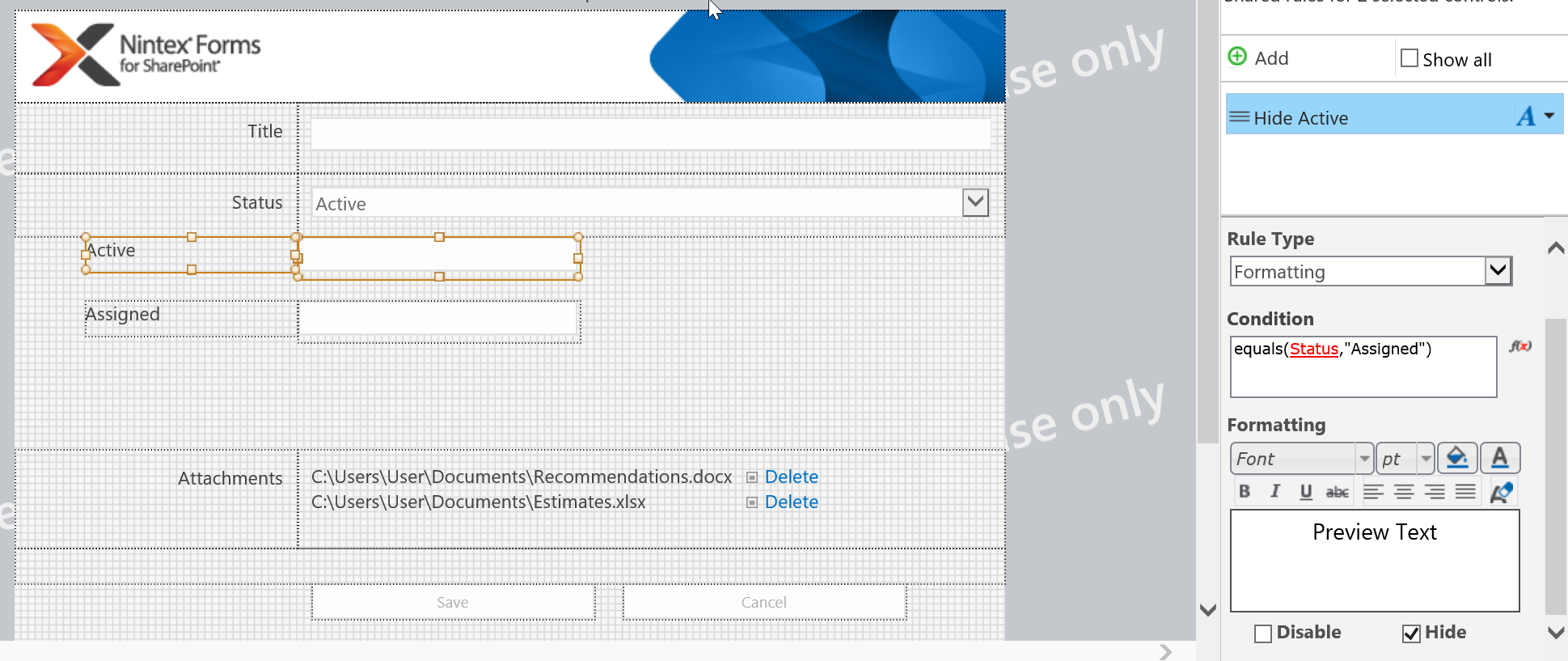
In my example I have a choice control called "Status" that has the options "Active" and "Assigned"

When I select Active I do not want to see Assigned textbox and viceversa.

So I apply a rule on the active control to say if Status is equal to Assigned then hide.

Then on the Assigned controls I do the same but hide if choice status is Active.


3 replies

butlerj
Nintex Employee
Forum|alt.badge.img+20
  • Nintex Employee
  • May 21, 2020

@shige08 are you using the Classic designer or the Responsive designer? The method will be slightly different between the two designers and want to make sure I give you the right information


  • Author
  • May 22, 2020
Hi @butlerj
Ohh I see..there is a difference between them..
We are currently using Classic Designer.

SimonMuntz
Nintex Employee
Forum|alt.badge.img+23
  • Nintex Employee
  • Answer
  • May 22, 2020

Hi,

In classic forms you apply a rule to the control you want to hide.

In my example I have a choice control called "Status" that has the options "Active" and "Assigned"

When I select Active I do not want to see Assigned textbox and viceversa.

So I apply a rule on the active control to say if Status is equal to Assigned then hide.

Then on the Assigned controls I do the same but hide if choice status is Active.




