

Nintex Community Menu Bar
Answer

Drop own options are not visible in Chrome

  • April 12, 2019
  • 1 reply
  • 11 views

Forum|alt.badge.img+7

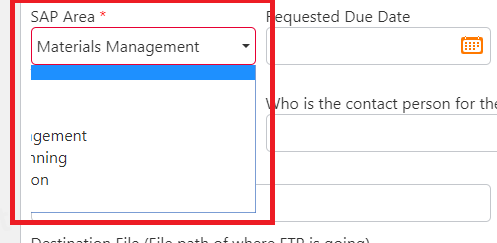
I am in the process of developing a form and during testing I have a user that is experiencing odd behavior. The choices in dropdowns are not entirely visible to the user when using Chrome. However, they appear fine for me. The users Chrome is up-to-date. Below is a screenshot of what the user is experiencing.  Has anyone ran into this issue and found a resolution? We are using Nintex for Office 365, which does support Chrome. Thanks in advance!

 

1483i43298513F7D30836.png


Best answer by eharris04

This seems to be a user browser specific issue. I have seen that happen before but random and cleared my cache and opened up a new browser instance and it was gone. Not 100% sure why, but have the user try those steps and see what you can do.

1 reply

Forum|alt.badge.img+17
  • Answer
  • April 15, 2019

This seems to be a user browser specific issue. I have seen that happen before but random and cleared my cache and opened up a new browser instance and it was gone. Not 100% sure why, but have the user try those steps and see what you can do.