

Nintex Community Menu Bar

DocGen and inserting html into document

  • July 24, 2019
  • 11 replies
  • 235 views

Forum|alt.badge.img+4

For all our form submissions I track the outcomes of every task as they're completed and write it back into the form itself. This way if any tasks or workflow history is deleted in the future, or the forms need to be moved, the audit trail stays in tact. 


The workflow history is a HTML table.
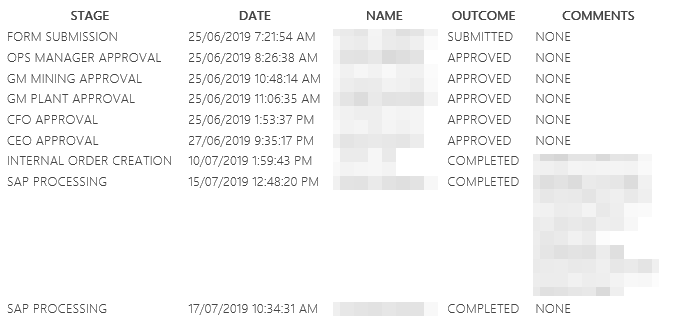
3263i23AF1C4658B1B3A9.png


When I tag a document for document generation all the HTML is removed and I'm left with a block of text.
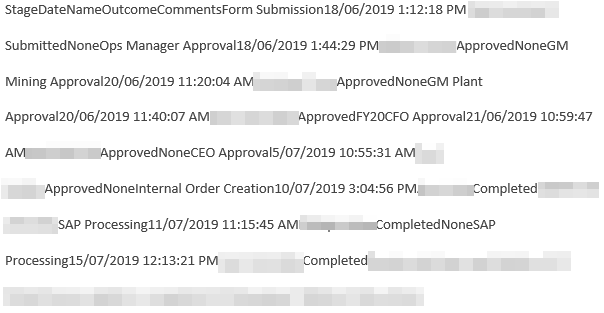
3264i02C3AE70FE73EBE7.png


I'd like to keep the format of my HTML table because it's so much easier to read. Does anyone know of a way to insert a html table into a word document when using the Document Generation action?


11 replies

Forum|alt.badge.img+17
  • July 25, 2019

@DocFather_Ray  or @rickdemarco may know.


I think the text coming from the workflow is text-based. Ideally, this is an MS Word formatting issue and you would need to create a table structure within the action to then doc gen the information as a table.  Lets see what they may come back with.


Forum|alt.badge.img+4
  • Author
  • August 1, 2019

For now I'm using a web service action to send info to an Azure runbook, bring back the table as a collection and then use the table function in the Document Generation action. Not sure how else to approach it. 


Forum|alt.badge.img+17
  • August 1, 2019

@elko thats actually a good approach for the table. If the data is available in the workflow as a table, then the output would be on the document generation action to complete.


Forum|alt.badge.img+9
  • October 17, 2019
is the table straight html in a multi-line text column in the SharePoint list?

Forum|alt.badge.img+4
  • Author
  • October 17, 2019
yes, exactly as you have described

Forum|alt.badge.img+9
  • October 18, 2019

can confirm, looks like table rich text/html isn't supported in document generation 


Forum|alt.badge.img+17
  • October 18, 2019

@Warwick I'm tagging one of our DG PMs @SamSysum to see if he can chime in on this.


  • Nintex Employee
  • October 18, 2019

@Warwick - @eharris04 is correct, unfortunately at this time we do not support Rich Text/HTML in the DocGen Action. This is something we have in our Backlog, we'll keep you posted as we get closer to implementing support. 


Forum|alt.badge.img+9
  • October 22, 2019

Rich Text is supported, it's just very buggy and half baked currently. Support for UL and OL, BR and P seems to work, but not much else and if you don't clean up classes and style via regex the action always fails


  • November 12, 2019

Is Rich Text support also available for DocGen in Nintex Workflow Cloud? I can't seem to get this to work (or maybe I'm missing something). I'm pushing the Rich Text tags into my document using a Workflow Variable. 


Forum|alt.badge.img+17
  • November 14, 2019

, unfortunately, that is not supportted at this time. See the earlier thread by one of our PMs  https://community.nintex.com/t5/Nintex-for-Office-365/DocGen-and-inserting-html-into-document/m-p/104143/highlight/true#M12086

