Nintex Community Menu Bar

How to Check current system user whether present in group or not

  • January 2, 2017
  • 3 replies
  • 61 views

Forum|alt.badge.img+5

Hi,


I am using k2 designer I need to check current system user whether present in a group or not.

3 replies

Forum|alt.badge.img+15

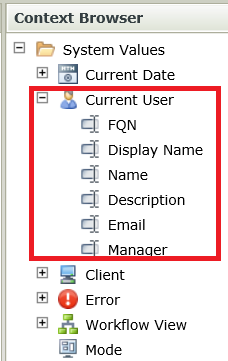
In K2 Designer, you can reference your current logged in user in your rules.


This means you can use a rule to execute a SmartObject method, then pass whatever value you want for the current user as inputs. Use this in combination with a AD User SmartObject to check if a user is in a particular AD group.


Here's what I will do:

1. Call the AD User's GetUsersByGroup method, specify the group you want to check in the input mapping, add a filter to filter out the current user, then map the result to a hidden data label. If the user belongs to a group, the filter will return one result. If not, nothing will be returned, so your hidden data label will be empty.


2. Add a conditional rule to check if that hidden data label is empty. If it is not empty, it means the user is in that group.


Forum|alt.badge.img+5
  • Author
  • January 7, 2017

Thank you soo much nerd... :)

Got the solution by using smartobject helper method.


Forum|alt.badge.img
  • October 29, 2018

Hi Team,


Could you please let me know which smart object i should use which tells me the details that perticular user belogs from perticular Role?


Regards,

Arun