

Nintex Community Menu Bar

View Code option not available under Exception Rule

  • January 13, 2014
  • 6 replies
  • 17 views

Forum|alt.badge.img+2

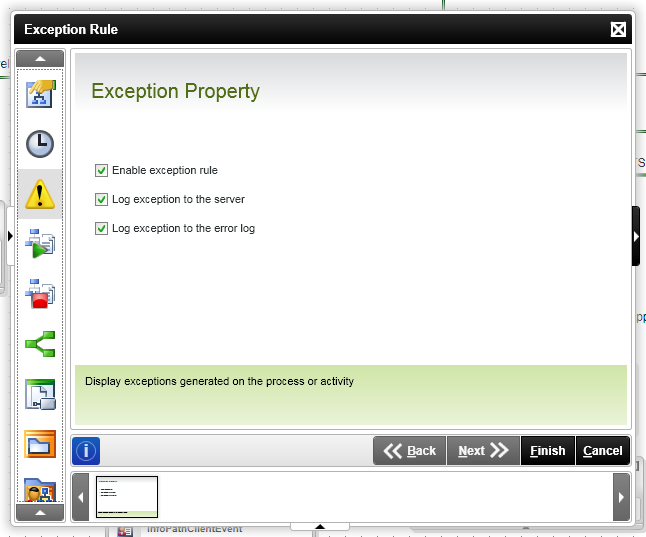
I have a workflow created and I'm trying to open the code window for the Exception Rule so I can paste in the code for generating emails for exceptions.  However, I don't see a view code option.  See attached screenshot.  A fellow developer is using K2 but using the .Net setup and they see a view code button between the "Exception Property" heading and the "Enable exception rule" checkbox.


Should I be looking in a different place for where to insert my exception code?  Is K2 studio handling the exceptions already and this is moot?  Or could I have a bad installation and need a reinstall?


13218iB4DF5FF6C1EF2775.png

6 replies

Forum|alt.badge.img+13
  • Rookie
  • January 13, 2014

Are you using BlackPoint or the stand-alone editor?   (not within Visual Studios?)


Forum|alt.badge.img+2
  • Author
  • Novice
  • January 13, 2014

I believe its just the stand-alone editor.  K2 Studio.


Forum|alt.badge.img+13
  • Rookie
  • January 14, 2014

K2 Studio does not offer code integrations, you have to use the K2 for Visual Studio to get the View Code features.


Forum|alt.badge.img+2
  • Author
  • Novice
  • January 14, 2014

Ok, so are the Exception emails auto generated with K2 Studio?  Is there a way I can configure them to specify recipients, etc?


Forum|alt.badge.img+10
  • Nintex Partner
  • January 14, 2014

Here a few options available


I've mostly used this option however, it needs to be added to every process (not really a big deal unless you aren't doing the process design and can get to the code level with Visual Studio) but there is a bug in K2 where some types of errors are not caught with raised exceptions like missing destination users for example. 


http://www.k2underground.com/blogs/pitchblack/archive/2009/11/24/generic-send-mail-k2-exception-handler-send-mail-on-process-error-exception.aspx


I've tried this service and modified the code a bit but personally I've had some problems with it.  With that said I've seen some very positive postings about it.


http://www.k2underground.com/groups/k2_process_error_notification_service_k2_pens/default.aspx


Your post just prompted me to test this out as its a new technique.  This looks promising and is relatively easy to setup and evaluate.  If I were you I'd probably start with this.


http://www.k2underground.com/blogs/johnny/archive/2013/12/03/using-powershell-and-task-scheduler-to-notify-for-k2-errors.aspx


Forum|alt.badge.img+2
  • Author
  • Novice
  • January 22, 2014

Thanks to everyone for your suggestions.  I ended up getting a copy of Visual Studio 2010 installed.  I'm able to access the K2proj file from K2studio in Visual Studio and make the Exception Code entries there.



