Nintex Community Menu Bar

Saving the body of Send Notification into a SharePoint library

  • October 9, 2020
  • 4 replies
  • 16 views

Forum|alt.badge.img+5

Afternoon


I'm working with Nintex 2013 On Prem and need to save the body of a Send Notification into a SP library. Has anyone done this before or have an idea how I could achieve it? Thanks in advance.


4 replies

Forum|alt.badge.img+8
  • Novice
  • October 12, 2020

Hi @Sutekh,

I would build the body in a variable (using build string action for example).
This variable can then be used in Send Notification and to update/create an item i a sp list.

If you need the mail in a library, you can enable it to receive e-mails in the library settings and put the lists mail address in bcc of your Send Notification 


Forum|alt.badge.img+5
  • Author
  • October 12, 2020

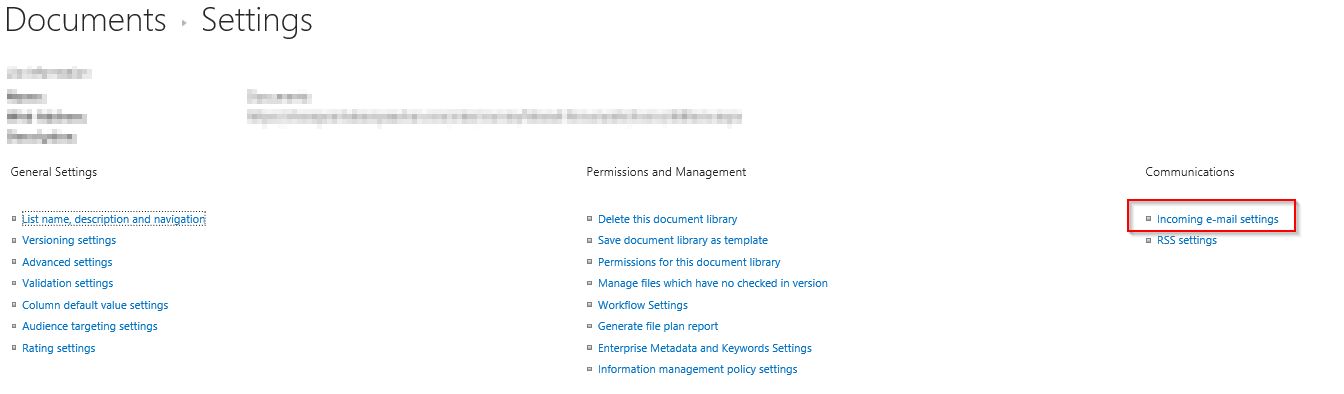
Thanks @Tarf . How would I enable incoming emails in the SP library. I've Googled it and as far as I can see it says I should have Communications under the settings but when I click on settings it's not there?


Forum|alt.badge.img+8
  • Novice
  • October 12, 2020

Hi @Sutekh,

I´m using SP2013 on Prem and its located here:

9229i589B3A86F22442DD.png


Maybe try adding a new document library and see if it is listed there.

In SP2019 this feature seems to be deactivated, see https://support.microsoft.com/en-ie/office/enable-incoming-e-mail-support-for-a-list-or-library-dcaf44a0-1d9b-451a-84c7-6c52e7db908e  


Michel
Nintex Partner
Forum|alt.badge.img+7
  • Nintex Partner
  • October 12, 2020

hi @Sutekh,


The 'Incoming email settings'-option will only become available if all email settings are configured correctly within the Central Administration. I've attached some hyperlinks for more information.


https://support.microsoft.com/en-ie/office/enable-incoming-e-mail-support-for-a-list-or-library-dcaf44a0-1d9b-451a-84c7-6c52e7db908e

https://docs.microsoft.com/en-us/sharepoint/administration/incoming-email-planning