

Nintex Workflow has actions “Web Request” and “Call HTTP Web Service” which can be used to make calls to the REST API of SharePoint Online/2013 to automate creation of SharePoint groups in a site collection.
Add the following steps to the workflow
- Create a Text variable GroupName and Use “Set Workflow Variable” to assign it to a value.
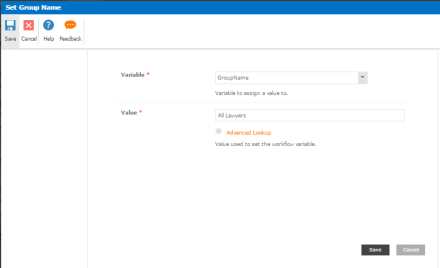
- Get request digest from targeted site collection. Please note that workflow app permissions need to amended to give site collection full control access.
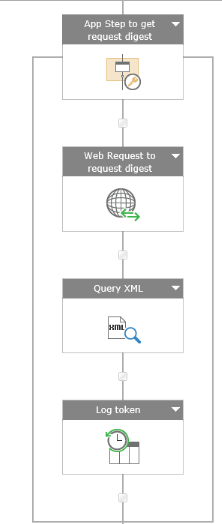
- Add “App Step” action
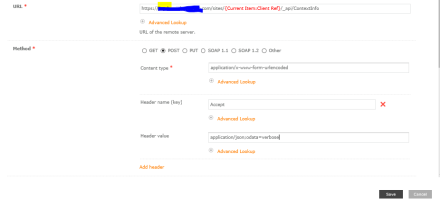
- Add “Web Request” action. Fill in the following fields
- URL: <siteURL> /_api/ContextInfo
- Method : POST
- Content type : application/x-www-form-urlencoded
- Header Name (Key) : Accept Header value: application/json;odata=verbose
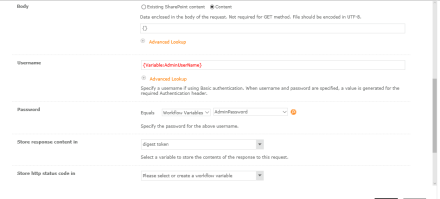
- Body : Choose “Content” option and enter “{}” in text field
- UserName: Credentials who has access to targeted site
- Password: password of above UserName
- Store response content in : Create a variable “digest token”
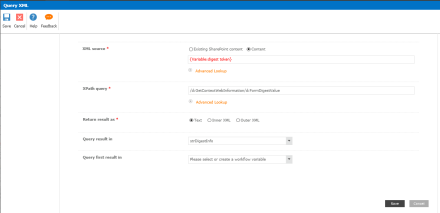
- Add “Query XML” action. Fill in the following fields
- XML source: Choose “Content” and pick variable “digest token”
- XPath query: /d:GetContextWebInformation/d:FormDigestValue
- Return result as :Text
- Query result in : create a text variable strDigestInfo
- Add “Log to History” action. Print the strDigestInfo to make sure valid request digest are used
- Create SharePoint Group using REST API /_api/web/sitegroups
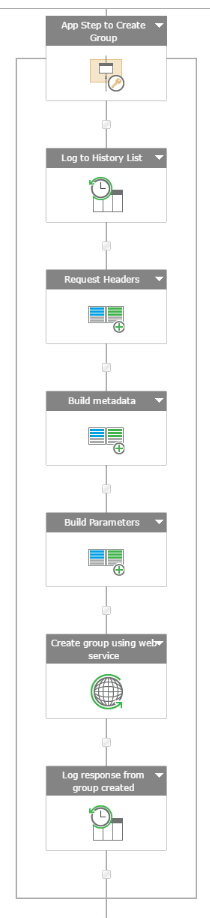
- Add “App Step” action. Optionally add “Log to History List” action to log status of workflow.
- Add “Build Dictionary” action to build “Request Headers”.
- Add the following key value pair as Text- content-type: application/json; odata=verbose
– X-RequestDigest : {Variable:strDigestInfo} - Save Output into RequestHeaders
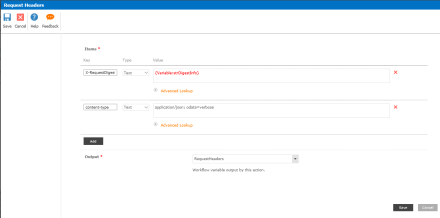
- Add the following key value pair as Text- content-type: application/json; odata=verbose
- Add “Build Dictionary” action to build “Metadata”
- Add the following key/value pair- key: type Type:Text Value: SP.Group
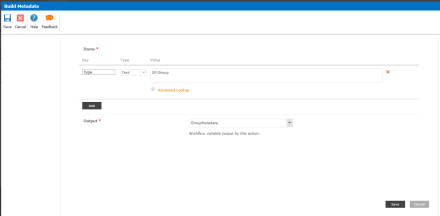
- Add the following key/value pair- key: type Type:Text Value: SP.Group
- Add “Build Dictionary” action to build “Parameters”
- Add the following key/value pair- Key: __metadata Type:Dictionary Value: Workflow Variable GroupMetadata
– Key: Description Type: Text Value: Group created automatically from Nintex workflow
– Key: Title Type:Text Value:{Variable:GroupName} - Assign Output to a dictionary variable GroupParameters
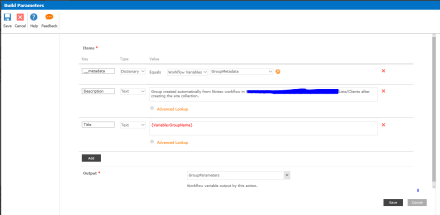
- Add the following key/value pair- Key: __metadata Type:Dictionary Value: Workflow Variable GroupMetadata
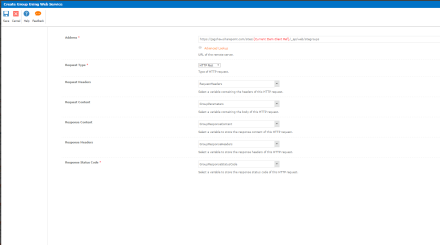
- Add “HTTP Web Service”action to create group
- Fill in Address : <SiteURL>/_api/web/sitegroups
- Set Request Type to “HTTP Post”
- Set Request Headers to dictionary variable RequestHeaders
- Set Request Content to dictionary variable GroupParameters
- Set Response Headers to new dictionary variable GroupResponseHeaders
- Set Response Content to new dictionary variable GroupResponseContent
- Set Response Status Code to new text variable GroupResponseStatusCode
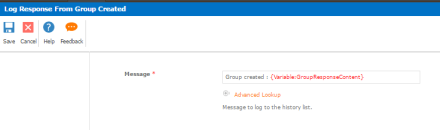
- Log to History list the response
- Retrieve SharePoint Group using REST API /_api/web/sitegroups/getbyname
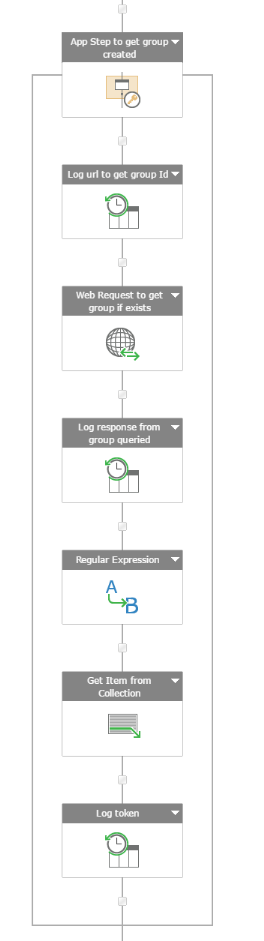
- Add “Add Step” action
- Optionally add “Log History List” action to log workflow status.
- Add a “Web Request” action
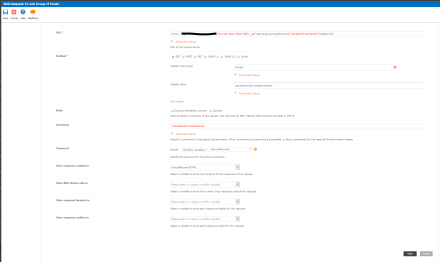
- Set URL to <SiteURL>/_api/web/sitegroups/getbyname(‘{Variable:GroupName}’)?$select=Id
- Choose Get for Method
- Click Add Header
- Set Header Key to “Accept”
- Set Header Value to “application/json;odata=verbose”
- Set UserName to user who has access to site collection
- Set Password to password of specified user
- Set Store response content in a Text variable GroupRequestIDXMLAdd
- Add “Log History List” action to log response GroupRequestIDXMLAdd from web request. The response is in JSON format. Nintex does not have a JSON parser action to retrieve value of property. Use “Regular Expression” action as described in the next step is used to retrieve Id value
- Add “Regular Expression” action
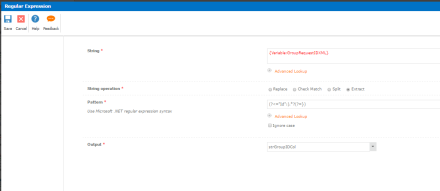
- Set String to {Variable:GroupRequestIDXML}
- Set String Operation to Extract
- Set pattern to (?<=”Id”:).*?(?=})
- Save Output to text variable strGroupIDCol
- Add “Get Item from Collection” action.
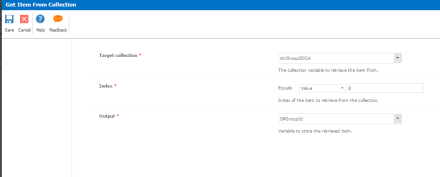
- Set Target Collection to variable strGroupIDCol
- Set Index to 0
- Set Output to SPGroupId
- Add “Log History List” action to log strGroupIDCol
- Add Contribute Role to new Group
- Add App Step action
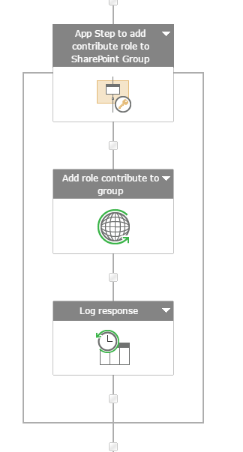
- Add “Call HTTP Web Service” Action
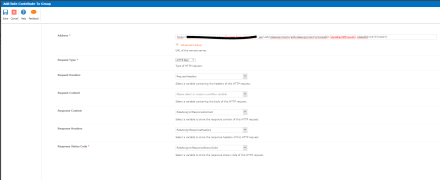
- Set URL to <siteURL>/_api/web/roleassignments/addroleassignment(principalid={Variable:SPGroupId},roleDefId=1073741827)
- Set Request Type to “HTTP Post”
- Set Request Headers to dictionary “RequestHeaders”
- Set Response Headers to new dictionary variable RoleAssignResponseHeaders
- Set Response Content to new dictionary variable RoleAssignmResponseContent
- Set Response Status Code to new text variable RoleAssignmResponseStatusCode
- Add “Log to History List” action to log response of web request
- Add App Step action
Save and Publish the workflow. If the workflow runs succesfully