Nintex Community Menu Bar

Manually start a workflow using a button on a form

  • December 16, 2020
  • 4 replies
  • 24 views

Forum|alt.badge.img+3

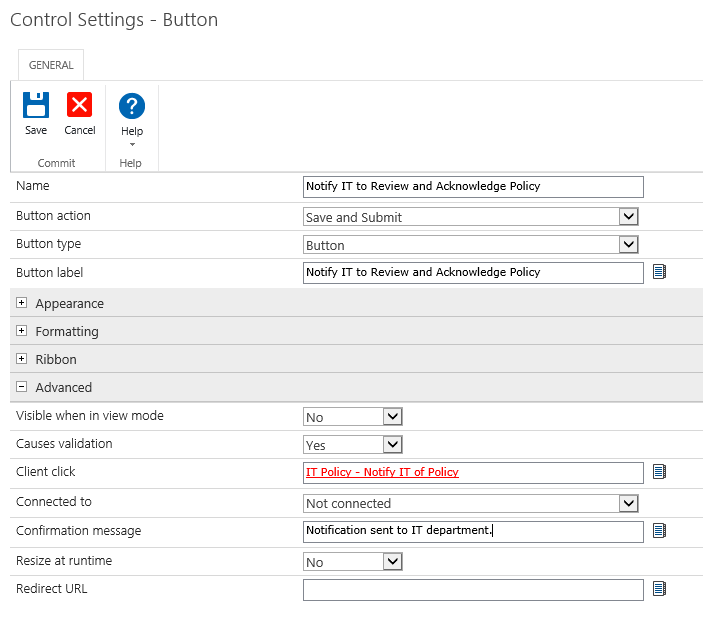
I have a workflow that sends an email.  It is set to manual start only.  I then have a button on my Nintex form that I want to trigger this email when clicked.


I cannot get the workflow to start when I click the button.


Is there another way to accomplish this?  I want the user to control when the email is sent and not based on some time of condition.
 

9722iA04880850ADB4C21.png

Thank you.


Devon


4 replies

Forum|alt.badge.img+11
  • Scholar
  • December 16, 2020

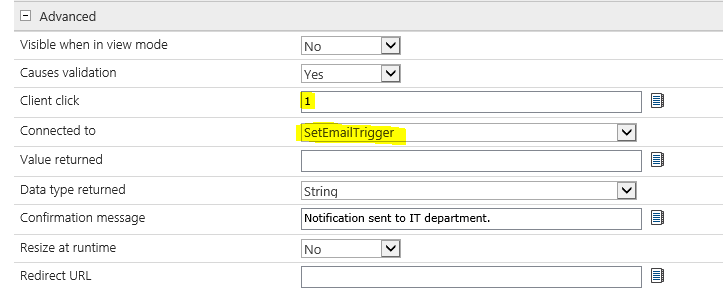
@dfox  in my case when I want to start a wf when pressing a button, I do the following:

1.- Create a number column set it default 0


2.-On your button set click Click to - 1 and then connected to- to the number column


3.- Add wait for action on your workflow,  set number column to equal 1. 


Forum|alt.badge.img+3
  • Author
  • December 17, 2020

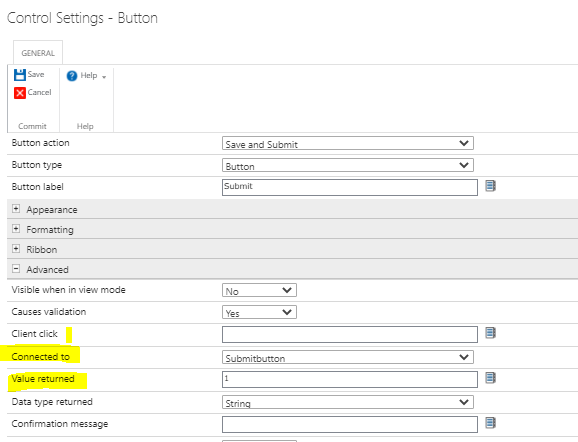
Great idea. I don't seem to be able to get it to work.  Here are the settings I have set up on the button after I created the new number column.

9735iD5B444A4E2F09B61.png

Did I misunderstand one of your steps?


Devon


Forum|alt.badge.img+11
  • Scholar
  • December 17, 2020

@dfox  Sorry, you have to enter 1 under Value returned, not client click. That should do it.


9736iFF87F7B07B738F3F.png


Forum|alt.badge.img+3
  • Author
  • December 17, 2020

That was it!  Thank you for a quick and easy solution.


Devon