

Nintex Community Menu Bar

Issue with Calculated Value formula issue causing form not to display

  • December 3, 2020
  • 2 replies
  • 22 views

Forum|alt.badge.img+3

I am having issues getting my form to display due to an issue with a calculated value formula to calculated the target completion date based on the Level selected and the Assign Date.  The Assign Date is also calculated and populated with a workflow to enter the current date and the form is submitted.


I have tried a couple of different combinations, but I can't seem to get around the issue.  Here is just the latest rendition of what I am trying to do.


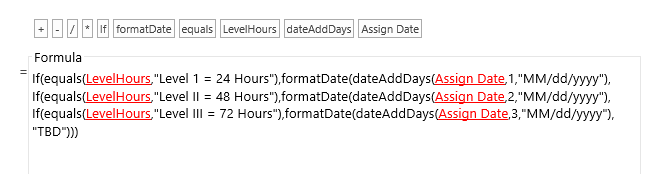
If(equals(LevelHours,"Level 1 = 24 Hours"),formatDate(dateAddDays(Assign Date,1,"MM/dd/yyyy"),
If(equals(LevelHours,"Level II = 48 Hours"),formatDate(dateAddDays(Assign Date,2,"MM/dd/yyyy"),
If(equals(LevelHours,"Level III = 72 Hours"),formatDate(dateAddDays(Assign Date,3,"MM/dd/yyyy"),
"TBD")))
 

9635iD65DB46B438BA6BD.png

I would appreciate any assistance as to where I am going wrong with this formula.


Thank you!!

 

2 replies

Simon Muntz
Nintex Partner
Forum|alt.badge.img+23
  • Nintex Partner
  • December 8, 2020

Hi.

It looks like you are missing closing Brackets on the format date function.
If(equals(LevelHours,"Level 1 = 24 Hours"),formatDate(dateAddDays(Assign Date,1,"MM/dd/yyyy")),If(equals(LevelHours,"Level II = 48 Hours"),formatDate(dateAddDays(Assign Date,2,"MM/dd/yyyy")),If(equals(LevelHours,"Level III = 72 Hours"),formatDate(dateAddDays(Assign Date,3,"MM/dd/yyyy")),"TBD")))


Forum|alt.badge.img+3
  • Author
  • December 9, 2020
Simon -

Thank you so much! That was exactly the issue. An extra pair of eyes certainly helped!!

Devon


