Nintex Community Menu Bar

Adding a letter prefix and year suffix to a field numbering sequence

  • December 10, 2020
  • 4 replies
  • 75 views

ncocchiara_77
Forum|alt.badge.img+2

I created a form and workflow for a SharePoint list.  I set up a calculation to populate a field with the next number using a next number list, variables, and math function in the workflow to calculate the next number for a new form entry.  The problem is, the user wants a location prefix (I have a field for location on the form) before the number, along with the current year after the number, so that the format for the next number will be: NYC_100_2020.  Can anyone help me with this?

4 replies

Forum|alt.badge.img+11
  • Scholar
  • December 10, 2020

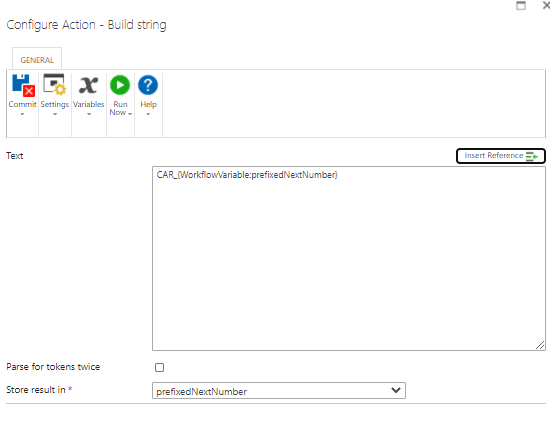
Not sure how your workflow looks, however in my case I added a build string action to add my text + nextnumber save it in a variable and then update my field with that variable containing CAR_001, CAR_002 etc


9667iD271BE7AA4566567.png


ncocchiara_77
Forum|alt.badge.img+2
  • Author
  • Rookie
  • December 10, 2020

The attachment below is how I made my workflow.  Where would you place the build string operation?


Forum|alt.badge.img+11
  • Scholar
  • December 11, 2020
Right after update SAR item list action and Before you update the form field action.

Forum|alt.badge.img+12
  • Scholar
  • December 11, 2020

@Nunezma …can't you use ID column? It's going to always unique and incremental.