Nintex Community Menu Bar
Solved

Sharepoint Nintex Workflow percent calculation

  • Sep 4, 2022 12:07 AM UTC
  • 4 replies
  • 199 views
  • Translate All

Hi. Been unable to find anything to help with an issue I am having. I have a SharePoint list that has a column titled "Completed" with a yes/no option. How do I create a workflow to go through all of the rows in that list, calculate how many people put yes and how many people put no, and calculate a percentage to be displayed?

Best answer by Simon Muntz

Hi,


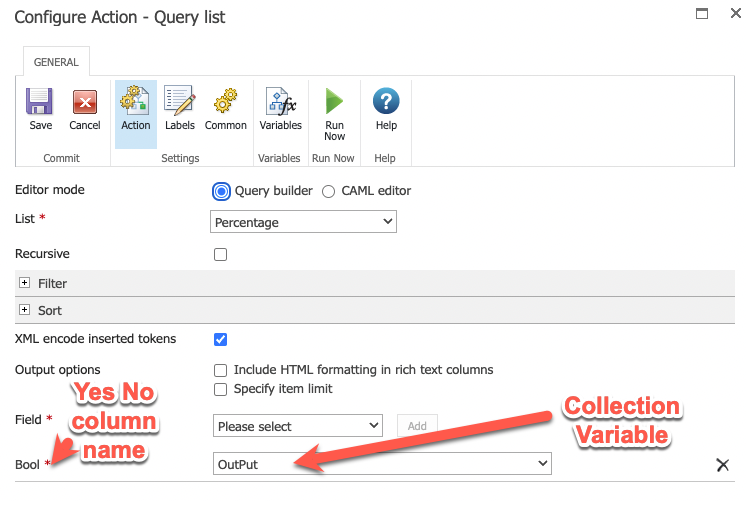
First you will have to query the list and store the Yes No column in a collection variable.
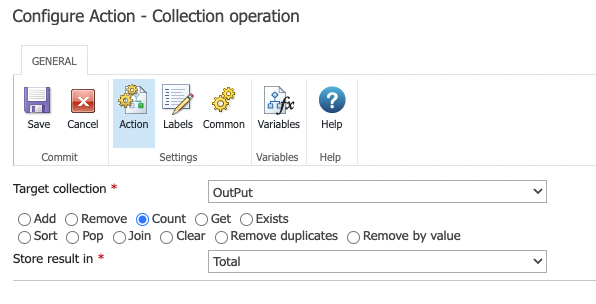
Next use a Collection Operation and count the total number of items returned by the query.
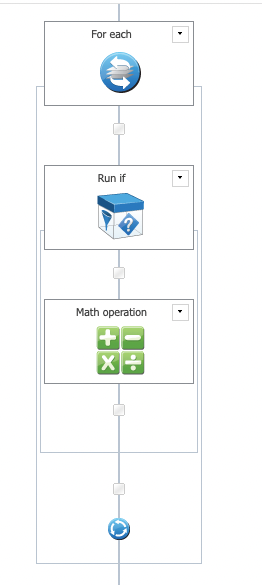
Next you will need to loop through the collection and look for the word Yes.  Every time you find it you add 1 to a variable.  This way you will know how many said yes.
You then use a math operation to divide the number of yes's by the total.

Then use another math operation to multiple by 100 and you will have your percentage.

See attachment for what the workflow layout would look like.

I also attached a workflow export.  You will need to re-configure the query list action.

 

View original

4 replies

Simon Muntz
Nintex Partner
Forum|alt.badge.img+23
  • Nintex Partner
  • Answer
  • Sep 5, 2022 6:37 AM UTC

Hi,


First you will have to query the list and store the Yes No column in a collection variable.

Next use a Collection Operation and count the total number of items returned by the query.

Next you will need to loop through the collection and look for the word Yes.  Every time you find it you add 1 to a variable.  This way you will know how many said yes.

You then use a math operation to divide the number of yes's by the total.

Then use another math operation to multiple by 100 and you will have your percentage.

See attachment for what the workflow layout would look like.

I also attached a workflow export.  You will need to re-configure the query list action.

 

Translate

  • Author
  • Sep 9, 2022 2:50 AM UTC

That worked out great! Apologize since I am still learning Nintex, how do I display the calculated percentage value from this workflow in a SharePoint page to be viewed?


Basically on a SharePoint page, we want to see the percentage complete within a column.

Translate

Simon Muntz
Nintex Partner
Forum|alt.badge.img+23
  • Nintex Partner
  • Sep 9, 2022 4:49 AM UTC
Hi,

In general, to update SharePoint columns you would use an Update Item action.
Translate

  • Author
  • Sep 9, 2022 2:22 PM UTC
That's what I thought, also tried "Update Item" action but I keep getting the result NaN
Translate