Nintex Community Menu Bar

removing i:0#.w| from notification and changing User name to display name in email

  • Aug 20, 2019 3:20 AM UTC
  • 4 replies
  • 423 views
  • Translate All

Forum|alt.badge.img+1

Hi all,


I have a simple form where I would like the email to display the "People" Column from the list as a display name.


However this i:0#.w| appears in front of the User ID. 

Is there a way to remove i:0#.w| and change the user ID to a display name?


Thank you! 

4 replies

Forum|alt.badge.img+11
  • Nintex Partner
  • Aug 20, 2019 8:48 AM UTC

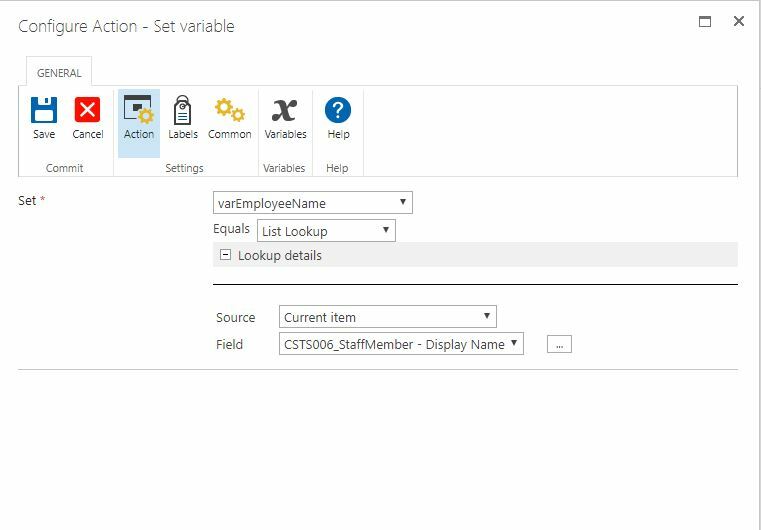
May I assume that it's a workflow that sends an email where you would like to show the People's column displayname(s)? If so, create a workflow variable and set it to the People column. Press the ... next to the column and select the (proper) Display Name. Back in the Set Variable it should show the select column as "People - Display Name".

Translate

Forum|alt.badge.img+9
  • Scholar
  • Aug 20, 2019 6:10 PM UTC

Following what @jpmhuls said, here is a screenshot of how I set my workflow variable.

4020i44C27CD23E2DD4A6.jpg

Translate

Forum|alt.badge.img+1
  • Author
  • Aug 22, 2019 1:02 AM UTC

Hey man, thank you! It worked perfertly!


Now I'm able to show my email notifications properly in the workflow! 

Translate

Forum|alt.badge.img+1
  • Author
  • Aug 22, 2019 1:03 AM UTC
Thanks Brian!

Your screenshot helped me find out where and how to set the variable.
Translate