Nintex Community Menu Bar

Invalidate a date field based when date field doesn't equal other date field and checkbox checked

  • April 27, 2020
  • 3 replies
  • 21 views

Forum|alt.badge.img+1

I have three fields: StartDate, EndDate, HalfDay.

If HalfDay is checked, StartDate and EndDate must equal the same day.


I'm trying to setup a rule on StartDate to invalidate if HalfDay is checked and StartDate and EndDate do not equal.


I've tried a few different things and couldn't get it to work.


This was the latest one I tried.

HalfDay && (equals(StartDate, EndDate) == "False")

3 replies

Forum|alt.badge.img+8
  • Novice
  • April 28, 2020

Hi,


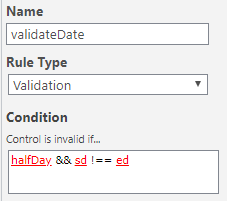
for me it works this way:

 7624iCE94DB5072D90A50.png 


I think you could alway wrap your equals in a "not" to achieve the same.

EDIT: Just checked, the formula halfDay && not(equals(sd,ed)) also works for me


Forum|alt.badge.img+1
  • Author
  • April 30, 2020

Thanks for the suggestion.  I just tried that out and I'm still getting the validation when the start date equals end date and half day is checked.


It seems to work right and removed the validation when Half Day isn't checked, but when it is checked and days are equal it still gives the validation.


I'm using named controls in my rules and both date fields are set to date only.


Forum|alt.badge.img+1
  • Author
  • May 4, 2020

Alright, I've finally figured it out.  Seems like a weird solution to have to do it this way, but it works.


and(dateDiffDays(StartDate, EndDate) != 0, HalfDay)
 
Basically when you do dateDiffDays on the same date it equals 0.  So any time it doesn't equal zero is the same as saying the dates don't match.