Nintex Community Menu Bar

How to set 0.00 as default value in a form field

  • October 2, 2019
  • 7 replies
  • 141 views

Forum|alt.badge.img+2

I have to set the default value of a number field in a Nintex form to 0.00. However, when i do that and publish the form, at runtime, it appears as 0 and not 0.00.

Any ideas on how to do this?

7 replies

Forum|alt.badge.img+12
  • Scholar
  • October 2, 2019

@Nabil1 ....I'm guessing you're using SLT control and allowing Decimal data types. Instead using String data types and put below RegEx in validation and pass the message that only numbers/decimals are allowed.


^[1-9]d*(.d+)?$


Simon Muntz
Nintex Partner
Forum|alt.badge.img+23
  • Nintex Partner
  • October 3, 2019
Hi,
If you configure the control as Currency and use 0.00 as the default it will work.

Forum|alt.badge.img+2
  • Author
  • October 3, 2019

So, is it not possible with a number field?


Forum|alt.badge.img+12
  • Scholar
  • October 3, 2019

@Nabil1 ....If you're using number list column and in decimal instead of Automatic, if you select 2 then it should work. Make sure that your form control is connected to that column or if you want create a list column first and then add that on the form from the list column list on the left side.


Simon Muntz
Nintex Partner
Forum|alt.badge.img+23
  • Nintex Partner
  • October 4, 2019

On a single lines of text control set to generic if you set the default value to fn-ToLower("0.00") that works as well.


nico
Nintex Partner
Forum|alt.badge.img+10
  • Nintex Partner
  • October 4, 2019

Hi,


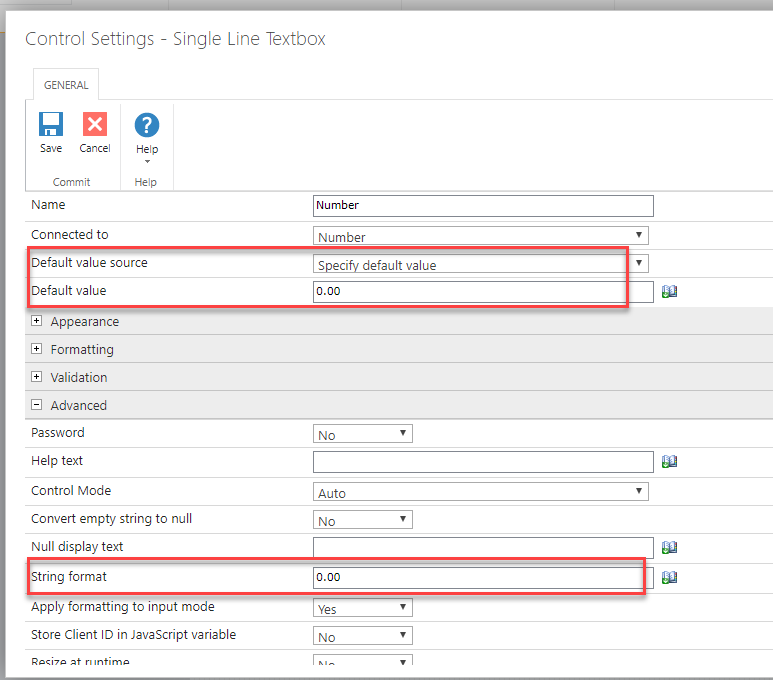
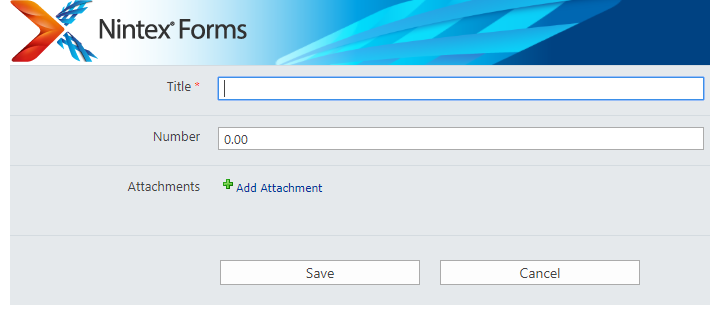
On you form, in the configuration of you control :

Set the default value to "0.00"

Set the String format to "0.00"


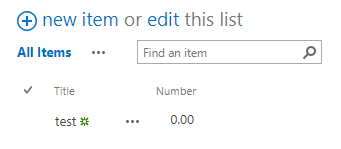
If you must save value to SharePoint, don't forget to configure your sharepoint number field to display 2 decimal


Like : 

4873i54BAB9B92AEEAD22.png4875iC0C7ADD3B5C55BDA.png4874i0C7F0B661E32F392.png


Forum|alt.badge.img+2
  • Author
  • October 11, 2019
Thanks a lot Nico.