Nintex Community Menu Bar
Question

Nintex Automation Cloud , read file from SharePoint Document Library into File Variable?

  • February 16, 2026
  • 14 replies
  • 68 views

Forum|alt.badge.img+1

We are looking for a possibility to Get file from SharePoint On premises Documents Library into File variable in NAC Workflow.

Using "Call a web service on Premises" I was able to get the file but as binary format.

Is there any way to get it in BASE64 Format in order to encode it as FILE Variable?

THE Target is to get file from Documents library into File Variable in NAC Workflow.

Any Feedback will be very appreciated.

Kind Regards

Aram Aljammal

14 replies

Forum|alt.badge.img
  • Novice
  • February 16, 2026

We have the same problem. There is no GetFile Action in OnPremise. I hope someone has a solution.


Simon Muntz
Forum|alt.badge.img+23
  • Collaborator
  • February 25, 2026

Hi ​@Aram229,

You could use a web service, as you have to retrieve the file and then use a custom connector from the Nintex Gallery that converts the binary into Base64.
https://gallery.nintex.com/t/toolkit-for-nwc


Forum|alt.badge.img+4
  • Scholar
  • February 25, 2026

My experience was the same as herti’s: I wasn’t able to find a GetFile action for on-prem SharePoint.
Also - I wasn’t able to pass a Nintex “file object” directly to a web service: the Nintex workflow passed a Nintex “blog reference”, vs. the binary data.
My solution was to write an Xtension.  Nintex Xtensions correctly pass the binary “file” data to the back-end REST services.  i implemented my own base64 encoder that accepted the “File” data, and passed back a base64-encoded text string. Exactly like the “toolkit-for-nwc” does.


Forum|alt.badge.img+1
  • Author
  • Rookie
  • March 3, 2026

Hi ​@Aram229,

You could use a web service, as you have to retrieve the file and then use a custom connector from the Nintex Gallery that converts the binary into Base64.
https://gallery.nintex.com/t/toolkit-for-nwc

Hello ​@Simon Muntz 
Thank you for the info. I already tried to do that using these actions 
unfortunately with no success to convert the binary file into Base64. 
Did it work with you?


Forum|alt.badge.img+1
  • Author
  • Rookie
  • March 3, 2026

My experience was the same as herti’s: I wasn’t able to find a GetFile action for on-prem SharePoint.
Also - I wasn’t able to pass a Nintex “file object” directly to a web service: the Nintex workflow passed a Nintex “blog reference”, vs. the binary data.
My solution was to write an Xtension.  Nintex Xtensions correctly pass the binary “file” data to the back-end REST services.  i implemented my own base64 encoder that accepted the “File” data, and passed back a base64-encoded text string. Exactly like the “toolkit-for-nwc” does.

Hello ​@paulsm4 Thank you for sharing your feedback. 
Could you share me your own base64 encoder? Or give me some instructions how to convert the binary file into Base64 using “Toolkit for nwc”? It will be for me a big help. 
Kind Regards
Aram


Forum|alt.badge.img+4
  • Scholar
  • March 5, 2026

I happened to write my base64 in Javascript (nodeJS), but there’s an equivalent one-liner in most languages.

My Xtension:
 

...
"/fax/api/base64-encodefile3": {
"post": {
"tags": [
"Fax"
],
"summary": "Base64 Encode File3",
"description": "Base64EncodeFile3",
"operationId": "base64encodefile3",
"consumes": [ "multipart/form-data" ],
"produces": [
"application/json"
],
"parameters": [
{
"in": "formData",
"name": "formData",
"type": "file",
"description": "File to Encode",
"required": true,
"x-example": "SGV5IHdoYXRzIGdvaW5nIG9u"
}
],
"responses": {
"200": {
"description": "OK",
"schema": {
"type": "object",
"properties": {
"Filename": {
"type": "string",
"x-example": "VA-Test-RFS.pdf"
},
"Mimetype": {
"type": "string",
"x-example": "application/pdf"
},
"Base64": {
"type": "string",
"x-example": "SGV5IHdoYXRzIGdvaW5nIG9u"
}
}
}
},
"400": {
"description": "Bad request or invalid input."
}
},


My NodeJS back-end:
 

...
/*
* base64-encodefile3: Post image in multipart form/return base64 text as JSON object
*/
router.post('/api/base64-encodefile3',
uploads.single('formData'),
async function(req, res) {
console.log('fax api@BASE64-ENCODEFILE3...');
if (!req.file) {
return res.status(400).send('No file uploaded.');
}
try {
console.log('originalname=' + req.file.originalname + ", length=" + req.file.buffer.length + ', mimetype=' + req.file.mimetype);
console.log('Buffer.from(req.file, utf8)...');
const buffer = Buffer.from(req.file.buffer, 'utf8');
console.log('buffer.toString(base64)...');
const base64String = buffer.toString('base64');
const result = {
"Filename": req.file.originalname,
"Mimetype": req.file.mimetype,
"Base64": base64String
};
console.log('res.status(200).json(result)...');
res.status(200).json(result);
}
catch (error) {
res.status(400).send('ERROR: ' + error.message);
}
});


Forum|alt.badge.img+1
  • Author
  • Rookie
  • March 5, 2026

I happened to write my base64 in Javascript (nodeJS), but there’s an equivalent one-liner in most languages.

Thanks you for the feedback ​@paulsm4 
Does that apply to all file types ? I mean excel, pdf, word etc.
Could you please write me where to pass my Binary file in your script? 
Thanks in Advance.


Forum|alt.badge.img+4
  • Scholar
  • March 5, 2026

Yes, a Nintex “File” object is applicable to all file types: Excel, Word, .pdf, .svg, .jpg, etc. etc.

You must create an Xtension to define the interface for your back-end REST web service.

The Nintex runtime passes the File object from your workflow to your REST service as “"Multipart form data".

My example code calls Buffer.from() and buffer.toString('base64') to read the binary data from the Multipart form and encode it into a base64 text string.


Forum|alt.badge.img+1
  • Author
  • Rookie
  • March 10, 2026

@paulsm4 
where should I upload the NodeJS back-end Part? 
By using this Xtension in my Workflow I’ve seen that it only take a file variable as input. 
In my Case I need Binary Input and the output should be in Base64 String. 


Forum|alt.badge.img+4
  • Scholar
  • March 10, 2026

Sorry I wasn’t clearer - I hope this helps:

  • To process Nintex “File” objects in your REST back end, you must have a Nintex “Xtension”.
     I gave an example Xtension above.  The nwc-toolkit also has some excellent examples.
  • In this case, you want to convert a “File” (in your workflow) to a Base64 text string.  A “File” is usually “binary” (for example, a .docx or .pdf), but could be ANYTHING.
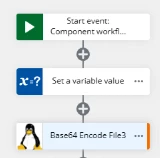
  • My Xtension passes the Nintex file to the back-end REST service in a “multipart form”.
  • “FileUploadURL” is the name of my Nintex “File” variable.  It’s just a “File”.
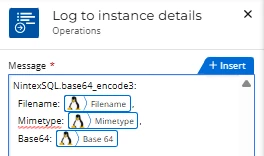
  • “base64_encode3_results” is an object defined in my Xtension, “NintexSQL”. 
    It’s a JSON object with three parts: 1) the original filename, 2) the MIME type and 3) the base64-encoded text string:


  • The Nintex runtime passes the File object from my Nintex workflow to my back-end (NodeJS) REST service as “"Multipart form data".

  • My example code calls Buffer.from() and buffer.toString('base64') to read the binary data from the Multipart form and encode it into a base64 text string.

  • The base64 text string is part of the JSON object returned back to the workflow from the REST service: “base64_encode23_results.Base64”

  • I can print everything out in a log message like this:
     

I hope that helps!


Simon Muntz
Forum|alt.badge.img+23
  • Collaborator
  • March 10, 2026

Hi ​@paulsm4,

I read that Nintex Gateway has a file-size limit for transfers.
Have you come across this issue? What size files can you transfer?


Forum|alt.badge.img+4
  • Scholar
  • March 10, 2026

Hi, Simon -

These are the only “limits” that I’m familiar with: 
  https://help.nintex.com/en-us/nwc/Content/Overview/Limits.htm

At one point, we were passing file attachments to our component workflows as base64-encoded Start Event text variables.  Since the total allowed size for the entire Start event payload is 2MB, this was untenable.

I know that the Nintex runtime stores “File” objects as “blobs” in the Nintex cloud, but I don’t know what - if any file size limit the Nintex Gateway might impose.

I’m comfortable, however, that there’s probably no issue for any objects our workflows are likely to need :)


Simon Muntz
Forum|alt.badge.img+23
  • Collaborator
  • March 11, 2026

Hi ​@paulsm4,

I heard that the limit was around 5MB to be passed through the Nintex Gateway, which is why I was asking the question.
The limitation is not documented, as Gateway was never intended to be used to pass large files. It was meant to pass along commands to on premise environments.


Forum|alt.badge.img+1
  • Author
  • Rookie
  • March 11, 2026

@paulsm4 
Thank you for your detailed feedback. 
This is unfortunately not my case. 
I am calling a file from SharePoint Document library using “call web service on premises” 
The result here is an Object variable obj_DirectFile
When I print the content of this object I am getting:


Now I want to convert this Binary Response content into Base64 String, this is my issue :(