Nintex Community Menu Bar
Solved

Permanently delete a Nintex Workflow

  • October 12, 2021
  • 5 replies
  • 245 views
  • Translate All

Usama

I have tried to rename a workflow, but instead of renaming it has created another workflow, and now I want to permanently delete the idle workflow. Any Idea? Thanks in advance.

Best answer by ajcrow

@Usama was your question answered?

You should be able to delete the specific workflow in question by going to your site and adding the following in the URL bar next to your specific site / site collection,

/_layouts/15/NintexWorkflow/NintexForSharePoint.aspx

If this does not work, try going into Site Settings -> Nintex Workflow -> Workflows for this Site.

You should be able to manage your Workflows from here.

View original

5 replies

Usama
  • Author
  • October 14, 2021

Is it not possible? 

Translate

Forum|alt.badge.img+6
  • Rookie
  • October 15, 2021

Hi.

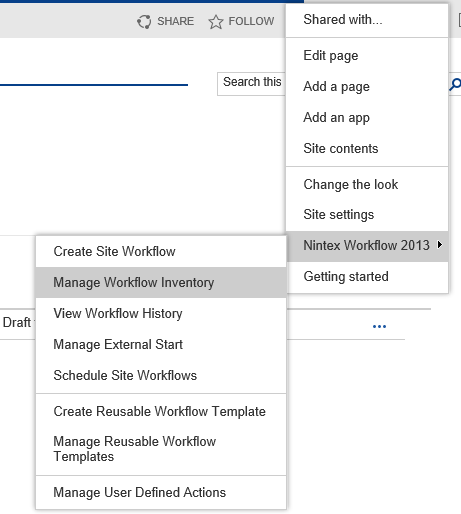
Go to Manage Workflow Inventory under the site actions gear.

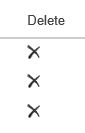
Click the Delete icon for that workflow

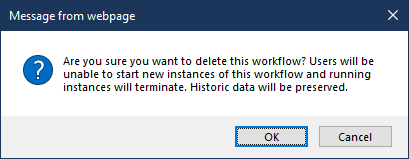
According to the dialog box.  this will terminate all running instances.


Translate

ajcrow
  • Answer
  • October 18, 2021

@Usama was your question answered?

You should be able to delete the specific workflow in question by going to your site and adding the following in the URL bar next to your specific site / site collection,

/_layouts/15/NintexWorkflow/NintexForSharePoint.aspx

If this does not work, try going into Site Settings -> Nintex Workflow -> Workflows for this Site.

You should be able to manage your Workflows from here.

Translate

Usama
  • Author
  • October 21, 2021

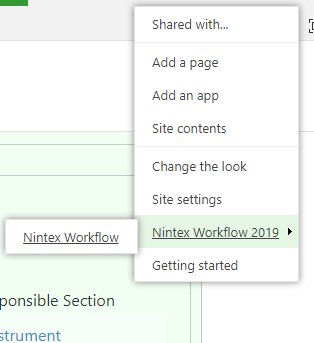
I just have the above options, I am using SharePoint server 2019. Are you using SharePoint online? 

Translate

Usama
  • Author
  • October 21, 2021

Yes, accessing directly through URL works for me. Thanks

Translate