Nintex Community Menu Bar
Question

Does anyone know where to change the background color for the filter drop down lists in a queue? I'm

  • Jul 10, 2024 12:29 AM UTC
  • 4 replies
  • 63 views
  • Translate All

Forum|alt.badge.img+1

Does anyone know where to change the background color for the filter drop down lists in a queue? I am trying to update the background in the theme builder but can’t find the proper component. Thanks!

4 replies

Forum|alt.badge.img+11

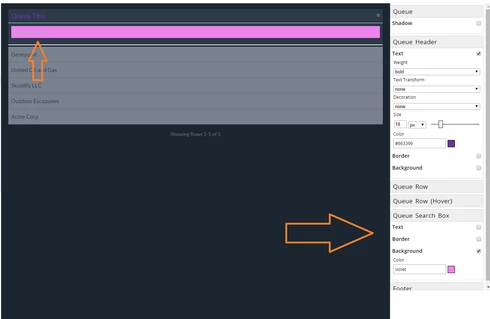
Does this work for you?


e8d0f256e00d613ce8943ffe6bcfdedba0b61aee.png

Translate

Forum|alt.badge.img+1

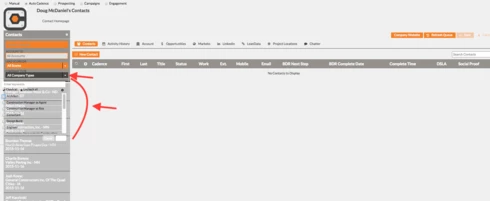
Thanks for the response, but that isn’t quite it. Here’s a picture of what I’m referring to:

As you can see, the search bar background is orange but the dropdown background is transparent so it’s nearly impossible to see the items in the drop down. Does that make sense?

Translate

Forum|alt.badge.img+11

I think this is controlled by Actions/Filters Dropdown Item style properties.  This may not be that useful since it applies to ALL filters.

Take a looksee,  Otherwise, you may need to resort to custom CSS.

Translate

Forum|alt.badge.img+3
  • Nintex Partner
  • Jul 10, 2024 1:13 AM UTC

You could do it in a custom CSS, for example target the class “ui-multiselect-menu” or something more specific and add a background color there.

Translate